Tutorial
Getting started
From zero to a complete valuation, install Kno, measure a baseline, value a pool of candidate assets, and read the decisions. No API keys, no spend.
This tutorial walks the whole loop against the free local agent: no API keys, no cost, and nothing leaves your machine. You will finish with a working understanding of every stage.
1. Install
curl -sSfL https://raw.githubusercontent.com/uknoAI/kno/main/install.sh | shThe script verifies a SHA-256 checksum (and a cosign signature if you have
cosign) before placing the binary on your PATH. Alternatives: Homebrew
(brew tap uknoAI/homebrew-tap && brew install kno) or
go install github.com/knograph/kno/cmd/kno@latest.
See Install Kno.
2. Write some cases
A case is one scoreable interaction, one JSON object per line, each with a
stable id:
{"id":"refund-01","input":"How do I get a refund?","expected":"Refunds are issued within 5 business days."}
{"id":"ship-01","input":"When does my order ship?","expected":"Orders ship within 1 business day."}
Save this as cases.jsonl. Real projects usually mine these from
production transcripts, see the mine how-to.
3. Measure the agent as it is today
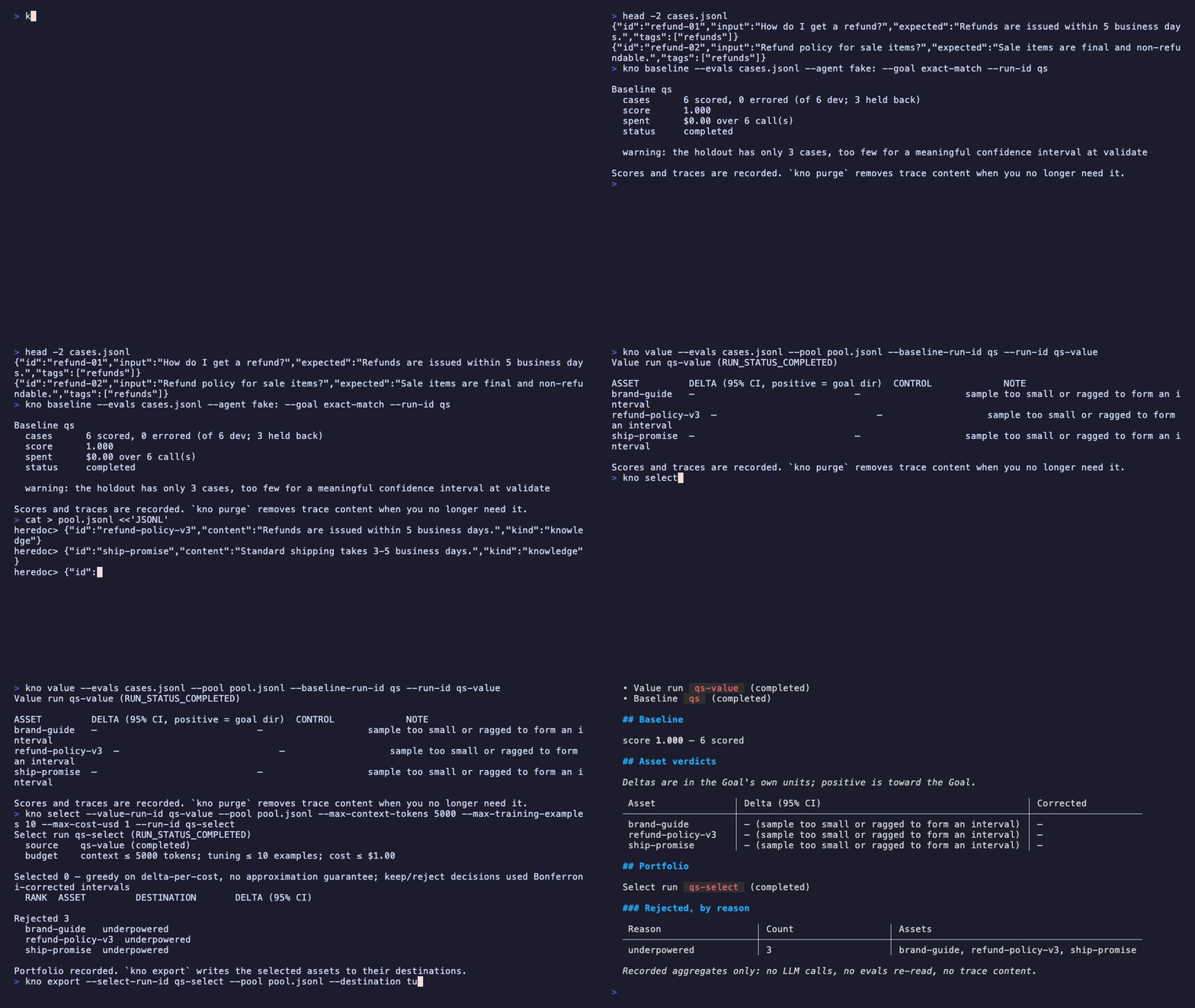
kno baseline --evals cases.jsonlBaseline 20260831T061838-6c9108b281e3
cases 7 scored, 0 errored (of 7 dev; 3 held back)
score 1.000
spent $0.00 over 7 call(s)
status completed
warning: the holdout has only 3 cases, too few for a meaningful confidence interval at validateThe baseline is the reference every later number is compared against. It
also seals a holdout: a slice of your cases that nothing, not valuation,
not selection, is allowed to read until validate. That separation is
why any number Kno reports later means anything.
4. Write a pool of candidate assets
The data you are considering adding, one JSON object per line:
{"id":"refund-policy-v3","content":"Refunds are issued within 5 business days.","kind":"knowledge"}
{"id":"refund-example-17","content":"Example: a 30-day-old refund request is declined.","kind":"knowledge"}
{"id":"brand-guide","content":"Use sentence case everywhere.","kind":"knowledge"}
Save as pool.jsonl. Pools also load from CSV (csv:pool.csv) and
Markdown (md:dir/), a bare path always means JSONL.
5. Value them
kno value --evals cases.jsonl --pool pool.jsonl --baseline-run-id <run id from step 3>Each asset is injected into the slices it could affect and re-measured against fresh controls. The output is one row per asset, a delta with its 95% confidence interval, plus a control reading.
Value run 20260831T061901-b4796cb4560b (RUN_STATUS_COMPLETED)

ASSET         DELTA (95% CI, positive = goal dir)  CONTROL             NOTE
brand-guide   +0.0000  [-0.3960, +0.3960]   low -0.5815 (underpowered)
refund-example-17  +0.0000  [-0.3960, +0.3960]   low -0.5815 (underpowered)
refund-policy-v3  +0.0000  [-0.3960, +0.3960]   low -0.5815 (underpowered)
The deltas read 0.0000 here because the free local agent answers every
case with what the case expects. That is the point: this run proves the
loop, routing, injection, controls, intervals, before real money is
involved.
6. Select and export
kno select --value-run-id <value run id> --pool pool.jsonl --max-context-tokens 10000
kno export --select-run-id <select run id> --pool pool.jsonl --destination knowledge_base --out export/
select builds a portfolio under budget with a rejection log; export
renders the selected assets into a destination grammar (context pack,
knowledge-base manifest, or tuning-set JSONL).
Next
- Point Kno at a real provider when the free path has shown you the loop.
- What the numbers mean before you put a delta in a slide.
- The repository’s full walkthrough and cookbook index.